

New in AutoCount 2.2.33.50 · BETA
✓ Built in · no plugin needed
Bank reconciliation that ticks itself
Load your PDF or CSV bank statement and AutoCount matches it to your transactions for you. Now in AutoCount Accounting 2.2.33.50.
- ✓PDF & CSV statements
- ✓Create missing entries in place
- ✓Learns your bank rules
PDF
Statement_Jul2026.pdf
Bank statement
Score
AutoCount
01/07SALARY JULY1,904.34
27
JV-000003 · 01/07SALARY JULY1,904.34
04/07 · CHQ 100231SUPPLIER PAYMENT200.00
42
PV-000006 · 04/07SUPPLIER PAYMENT200.00
05/07OFFICE RENTAL3,500.00
26
PV-000007 · 04/07OFFICE RENTAL3,500.00
07/07BANK CHARGES44.55
—
+ Create paymentNot in AutoCount yet
Matched 3 of 4 automatically
Pass mark: 26 pts
Bank RulesRemembered for next month
Statement balanceFilled in automatically
Works with
PDF statements
CSV statements
Cash Book
AP Payment & AR Refund
Journal Entry
Why switch it on
Month-end bank rec used to eat your afternoon
Ticking bank lines one by one
Now: load the statement and matching lines are ticked for you.
Leaving the screen to key in missing entries
Now: create Cash Book, Payment, Refund or Journal from the unmatched line.
The same bank charges, keyed every month
Now: Bank Rules remember the account and Batch Process creates them in one click.
How it solves it
Upload the statement. AutoCount does the matching.
Load bank statement
Auto-match by score
Match or Combine Match the rest
Create missing entries on the spot
Bank Rules remember it
Date · up to 17
Cheque no. · up to 15
Description · up to 10
Key features
Everything inside the Bank Reconciliation screen
Load your statement, get matches
GL › Bank Reconciliation › Load Statement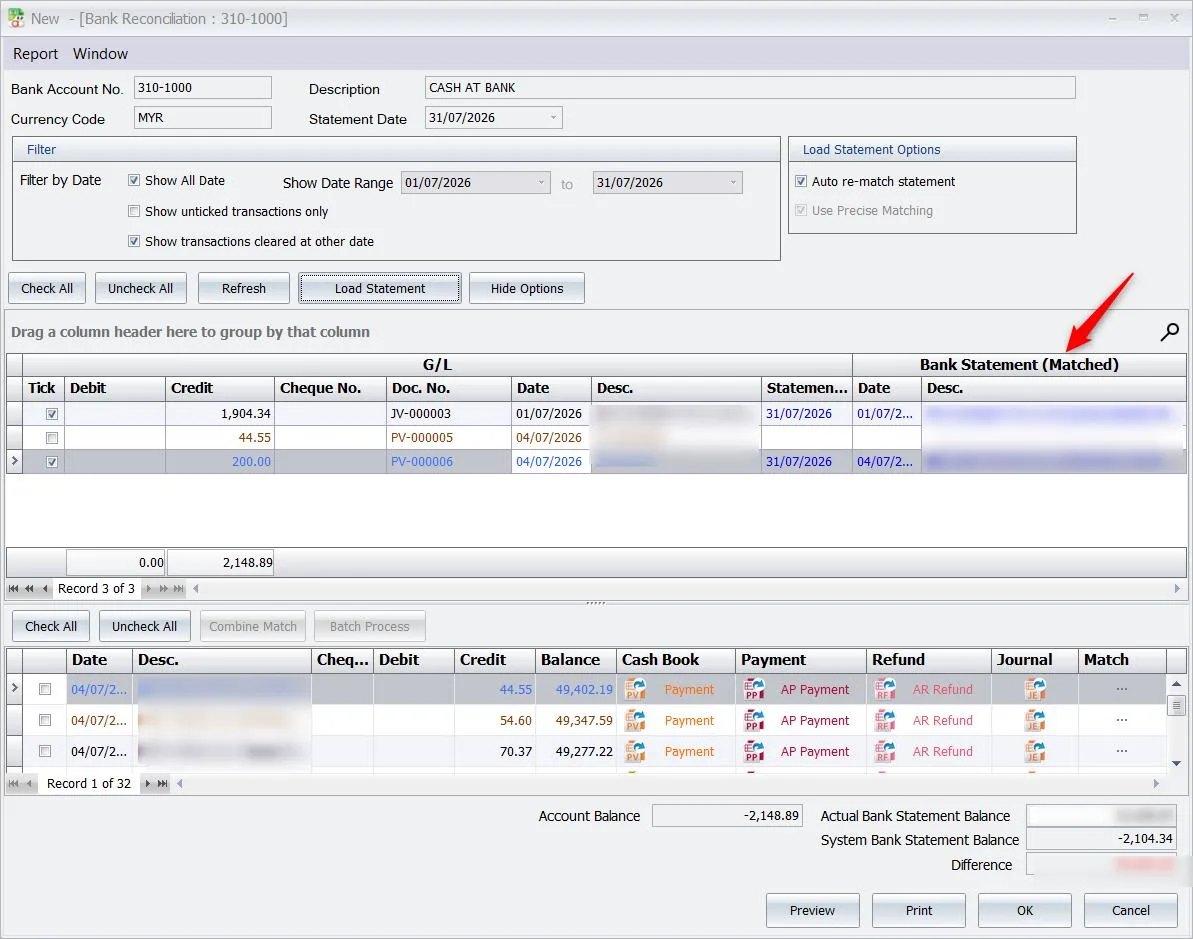
- PDF or CSV statement
- Actual statement balance filled in
- Auto re-match after new entries
- Precise (26 pts) or lenient (13 pts) matching
Create the missing entry without leaving

- Cash Book · Payment · Refund · Journal
- Description filled from the statement
- Just pick Debtor, Creditor or AccNo
Match the ones AutoCount missed
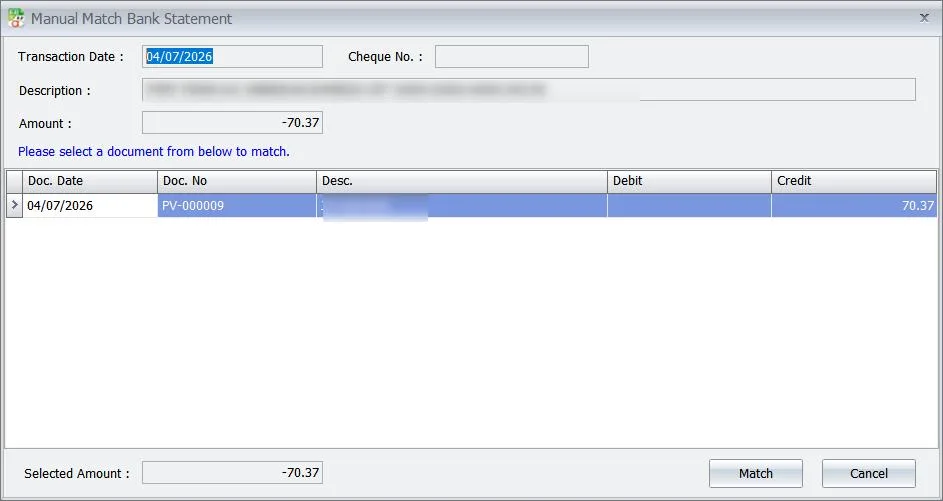
- Pick the right document
- Reconciled on click
One payment, two bank lines? Combine them
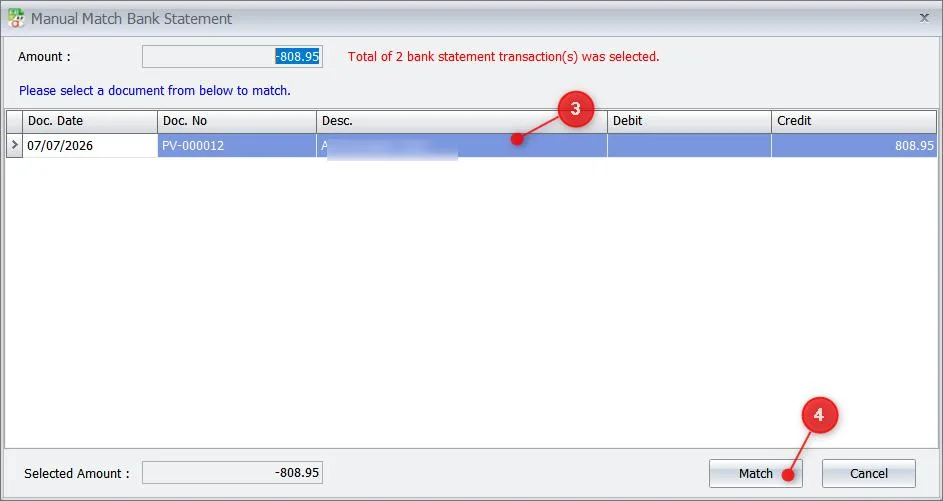
- Select 2+ statement lines
- Match to one Payment Voucher
Create next month's repeat entries in one click
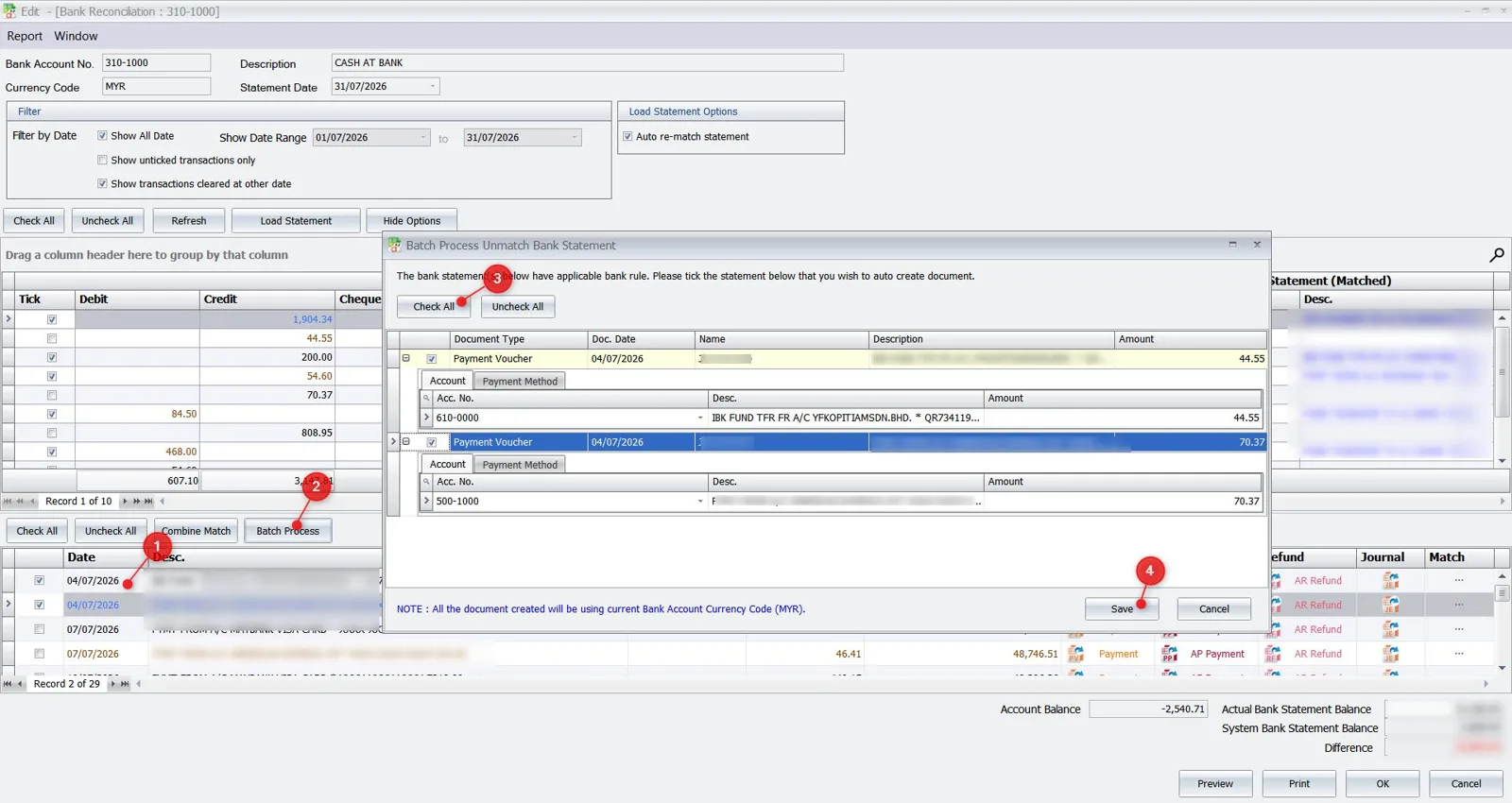
- Tick lines, click Batch Process
- Documents created and auto-matched
- Currency shown for reference
Bank Rules: it remembers what you did
July · first time
07/07BANK CHARGES44.55
↓
You pickAccNo 905-0000
⟳
Saved to Bank Rules
August · next time
06/08BANK CHARGES38.20
↓
Filled in for youAccNo 905-0000 ✓
- Remembers manual matches
- Remembers documents you created
- Better matching every month
BETAGood to know
- First use downloads the required component and asks you to confirm BETA.
- Scanned (image) PDF statements are not supported yet.
- Transfers from another currency are created in the bank account's currency (e.g. MYR).
Who it's for
For anyone who reconciles a bank account in AutoCount
Accounts & finance teams
Month-end bank rec
Busy bank accounts
Hundreds of lines a month
Bookkeepers & accounting firms
Many clients, many banks
Business owners
Know your bank position sooner
How to start
Start auto bank rec in 4 steps
- 01 Back up your database This version upgrades it to 2.2.98
- 02 Upgrade AutoCount Accounting Presoft can do it for you
-
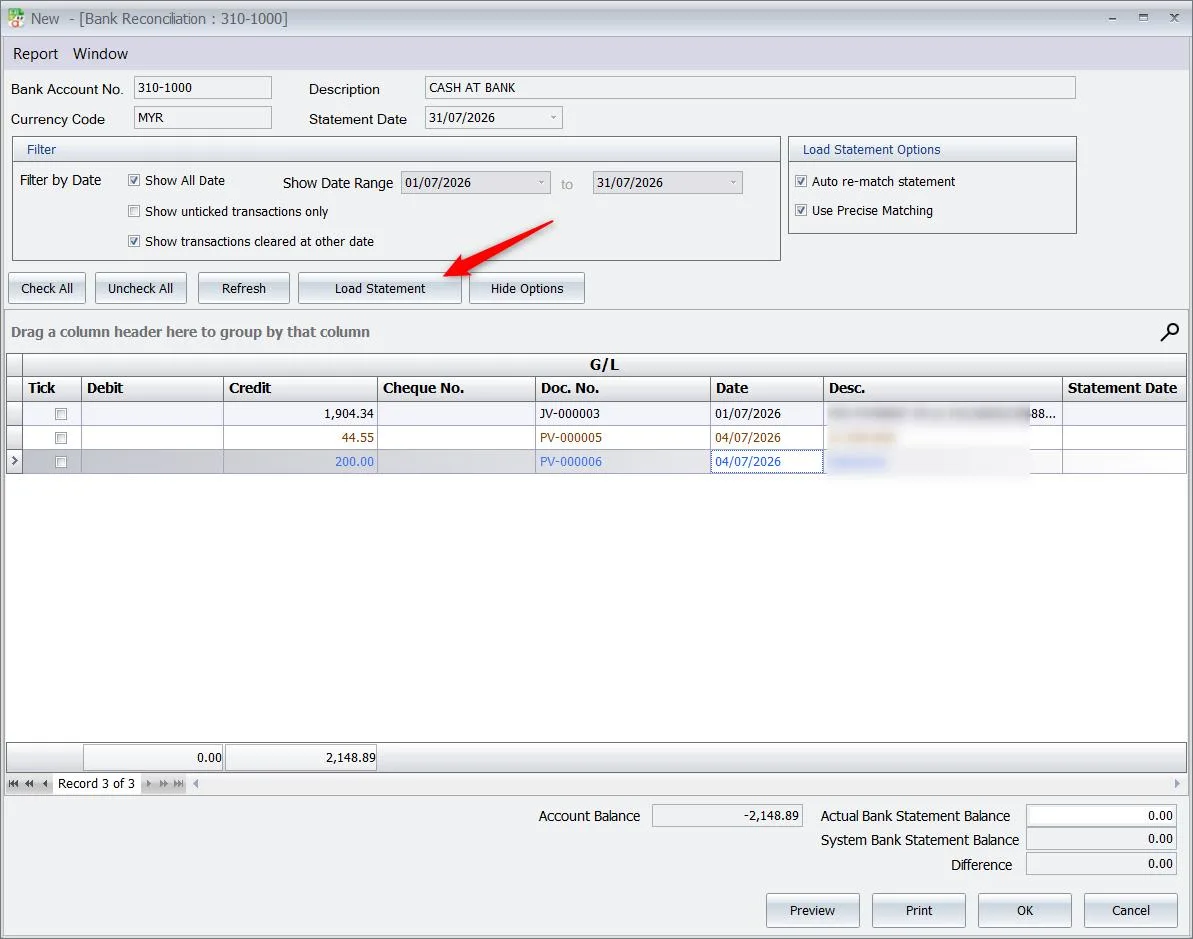
03 GL › Bank Reconciliation › Load Statement First time: allow the BETA download
-
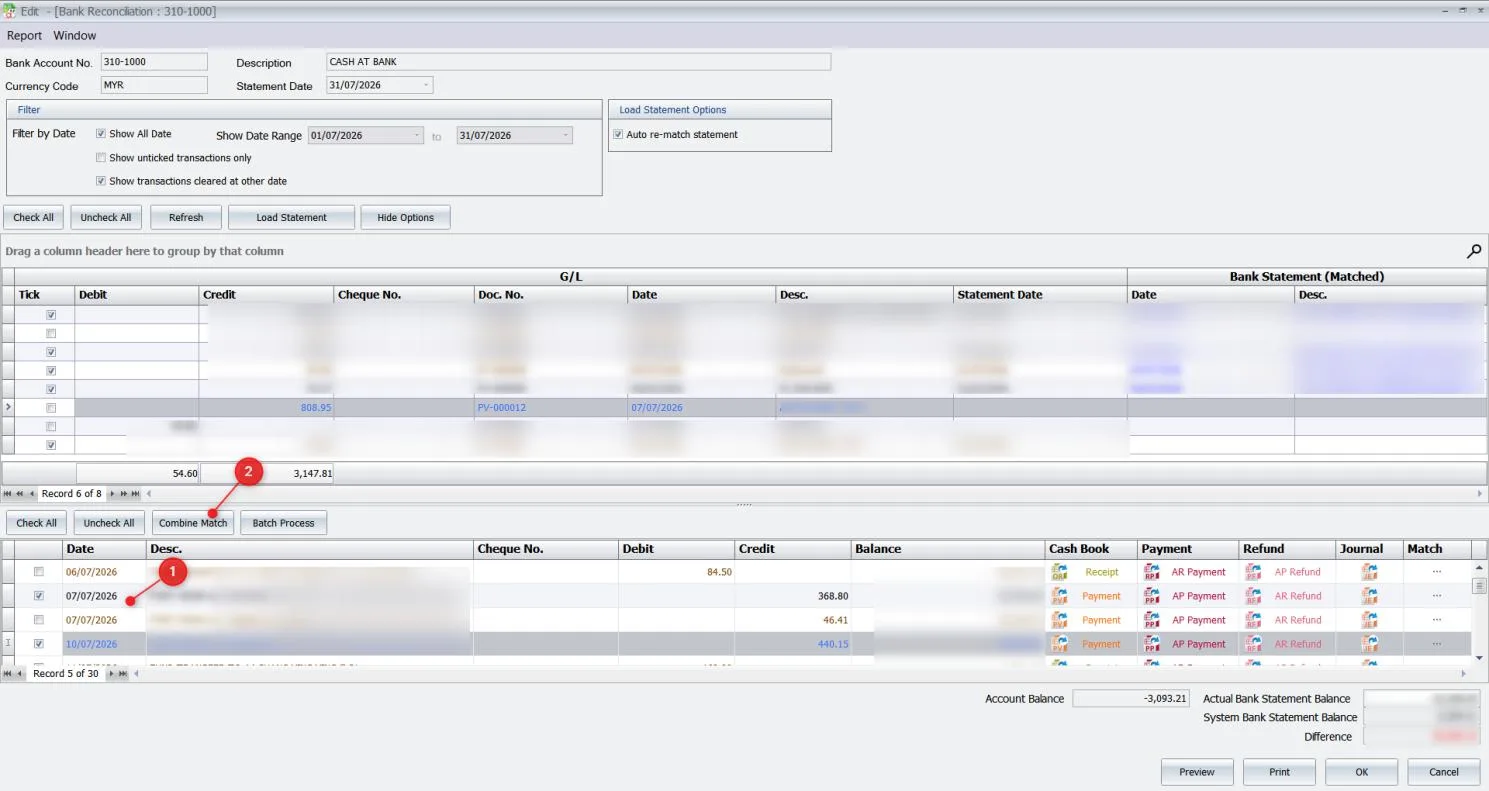
04 Review matches, then save Bank Rules carry over next month
Contact us
Try Auto Bank Rec with Presoft
- ✓Upgrade to 2.2.33.50 done by our team
- ✓Walkthrough of Auto Bank Rec with your own statement
- ✓Reply within 1 working day